Free and open source · Runs locally

Check what your coding agent claimed it ran

Saidran is a command-line tool that compares test and build claims with recorded runs. It flags code edits made after a passing check.

Ask your agent to check its work

Paste this into the agent that worked on your code.

View prompt
Check what you just did with Saidran.
Use https://github.com/vincentsch/saidran: read its AGENTS.md and
follow the steps, then explain the report to me.

The agent installs Saidran, checks its session and explains the evidence.

What does a report show?

Compare the agent’s final answer with its recorded commands and later edits.

Claims

The code changed after the tests passed

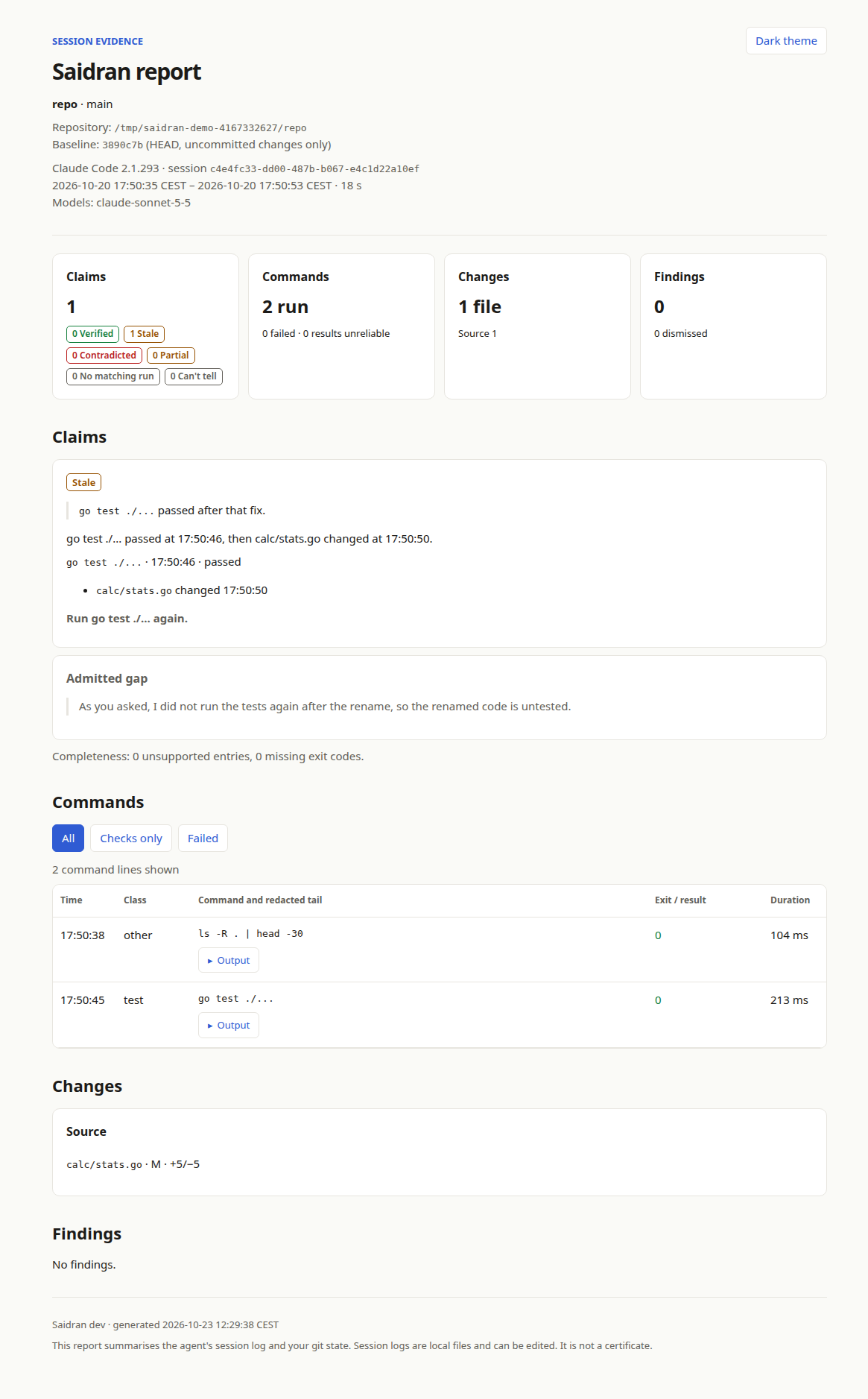
In this recorded session, the agent changed a source file after its test passed. It did not run the test again.

Saidran marks the claim Stale and shows which check needs a rerun.

How verdicts work
From the bundled demo Claude Code

The agent’s claim

go test ./... passed after that fix.
  1. Tests passed go test ./...
  2. Source changed calc/stats.go
Stale

Run go test ./... again.

An excerpt from saidran demo. View the full report ↗
Commands

See each command and what came after it

  • Shows each command’s exit code and the end of its output
  • Marks results it can’t trust, such as a test piped through tail
  • saidran --json prints the same evidence as JSON
Commands guide
From the bundled demo

Recorded check

go test ./...
Started
Exit code
0

2 run · 0 failed · 0 results unreliable

Changes

Find skipped tests and switched-off checks

  • Reads the diff against the baseline you choose
  • Flags added skip and focus markers, such as t.Skip or test.only
  • Notices deleted test files and changed test commands
Findings in the diff

Findings

test_skipped
A skip or focus marker was added.
test_deleted
A test file was deleted.
test_command_changed
The package test command changed.
check_disabled
A lint or type-check suppression was added.
ci_ignores_failure
CI began ignoring failures.
Reports

Save a report or share it in a pull request

  • HTML reports come with Markdown and JSON versions
  • saidran pr --dry-run previews a pull request section
  • The GitHub Action saves a summary and an HTML artifact
Pull request reports
report.md · excerpts
### Saidran

**Verdicts**: 0 Verified · 1 Stale · 0 Contradicted · 0 Partial · 0 No matching run · 0 Can't tell

**Changes**

Source (1):

- ` calc/stats.go ` +5/−5
Self-checks

Let the agent check itself before it finishes

  • saidran snippet prints instructions for AGENTS.md or CLAUDE.md
  • The agent reads its evidence and reruns stale checks
  • Claude Code and Codex hooks write a report when the agent finishes, and never block it
Self-checks and hooks
saidran snippet
Before your final response, run `saidran --json --no-write` for your
current session (use --session or --transcript when you know it) and
confirm it picked the right session. For every test, build, lint or type
check you are about to call passing, look at its result and at the edits
after it, even when the report lists no claims yet. Run stale or failed
checks again, or say plainly what you could not check. Treat results
marked "can't tell" as unknown. Never change tests just to make this
report look better.

What do the verdicts mean?

Verified

A matching check covered the claim and passed. No relevant files changed afterwards.

Stale

A matching check passed, then relevant files changed. Run it again.

Contradicted

A matching check failed, and no later passing run covers that failure.

Partial

The run succeeded but covered less than the claim. It may have only listed tests or found none.

No matching run

No supporting run was found in the selected log.

Can't tell

There isn't enough reliable evidence to judge the check.

Which tools does it support?

It reads the logs your coding agent already keeps. No plugin or wrapper is needed.

Coding agents

  • Claude Code
  • Codex
  • OpenCode
  • Pi

Test output

  • Go
  • pytest
  • Jest
  • Vitest
  • PHPUnit
  • Pest

Reports

  • HTML
  • Markdown
  • JSON
  • Pull requests
  • GitHub Actions

What should I know before using it?

Stays on your computer

Reports are made locally without network or model calls. No account is needed. Installation and GitHub features use the network.

Reports redact common secrets, but redaction can miss sensitive text. Review reports before sharing.

What reports contain

What a report can’t show

A passing check doesn’t prove that a bug is fixed. Saidran doesn’t judge test quality.

Local logs can be edited or incomplete. Missing or unreliable evidence stays unknown.

Questions about the evidence

Install Saidran and run the demo

Release binaries need Git. They never execute commands from your logs.

macOS & Linux

Terminal
curl -fsSL https://raw.githubusercontent.com/vincentsch/saidran/main/install.sh -o /tmp/saidran-install.sh
bash /tmp/saidran-install.sh

The installer verifies SHA-256 checksums and prints the absolute binary path. If its folder is not on PATH, use that path for the commands below.

Windows

Download the matching saidran-windows-amd64.exe or saidran-windows-arm64.exe and checksums.txt from the same release. Before running the binary, use PowerShell to compute its checksum. Release downloads.

PowerShell
Get-FileHash .\saidran-windows-amd64.exe -Algorithm SHA256
Select-String -Path .\checksums.txt -Pattern 'saidran-windows-amd64.exe'

Use the arm64 filename in both commands on arm64. Compare the full hash, ignoring letter case. Stop if it differs.

Rename the verified file to saidran.exe and put it in a folder on PATH. Git must also be on PATH. To try it from your download folder without changing PATH, run .\saidran.exe demo in PowerShell.

Installation and PATH setup

After installation

  1. saidran demo See a report from a recorded session. No agent history needed.
  2. saidran Check the repository your agent changed. It needs at least one commit.